The Capacity of a Single Instance: Little's Law in Practice
One Tuesday afternoon, the search service is running smoothly, processing 100 requests per second with response times of under 100 milliseconds. Then the marketing team sends out the weekly newsletter. Within three minutes, traffic surges to 500 requests per second. Initially, response times skyrocket to 800 milliseconds, eventually reaching several seconds. Shortly afterwards, the first users see error pages.
Examining the logs reveals no exceptions, slow queries or network issues. Instead, there are timeouts. Lots of timeouts.
What capacity does this service have? Do we need additional instances to handle the load, or will a single instance suffice?
The answer lies in a 1961 tool from the field of queuing theory.
Three quantities that describe every system
Every service that receives and answers requests can be understood as a queuing system and characterised by three values:
Throughput $\lambda$ (Lambda): The average number of requests completed per second. When a system collapses under load, dropping or queuing requests, it processes fewer than arrive. Throughput describes what actually gets through, not what is requested.
Response time W: The average time a request spends in the system, from arrival to completed response. For the search service in our example, W (for waiting) was 90 milliseconds, of which about 70 milliseconds were spent on database access.
Concurrency L: The average number of requests in the system at any given moment. If this value rises – say because more requests per second suddenly arrive – it can lead to collapse.
These three quantities are not independent. They are connected by a formula that John Little proved in 1961.
Little’s Law
The intuition behind Little’s Law can be understood using the example of a supermarket checkout – a typical queuing system. Customers arrive, wait in line, pay, and leave the shop. The throughput $\lambda$ is limited by the cashier: scan all items, take payment. How many customers are at the checkout on average?
The answer depends on two things: how many customers are served per minute and how long each spends at the checkout on average. At two customers per minute and an average total time of three minutes, there are on average six customers at the checkout at any given moment.
Little proved in 1961 that exactly this relationship holds for every stable queuing system, regardless of how arrivals are distributed, how many checkouts are open, or what priority rules apply:
\[L = \lambda \times W\] \[\text{Concurrent requests} = \text{Throughput} \times \text{Response time}\]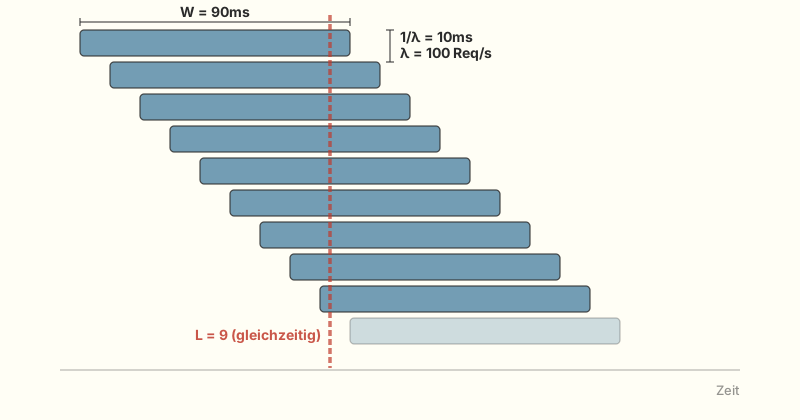
The term “stable” means in this context that the system is able to keep up with the arrival rate – that it is not overloaded. If that is not the case, more customers wait from minute to minute, response times rise, and the equation no longer holds. Time to open another checkout.
Applying Little’s Law to the search service: at 100 requests per second and 90 ms response time, 9 requests are in the system simultaneously:
\[L = 100 \text{ req/s} \times 0.09 \text{ s} = 9 \text{ req}\]Nine concurrent requests. The thread pool with 200 slots is far from its limit. And at the newsletter peak?
\[L = 500 \text{ req/s} \times 0.09 \text{ s} = 45 \text{ req}\]45 concurrent requests. With a pool of 200 threads, that sounds uncritical – and it is, because the thread pool wasn’t the bottleneck at all: the problem was one level deeper.
One service, multiple queuing systems
A web service is a chain of queuing systems. Every request passes through multiple stations, and each one can become a bottleneck: Request → Thread Pool → Connection Pool → Database.
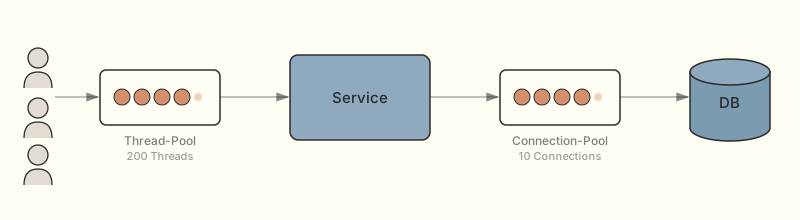
Little’s Law can be applied to each of these stations individually – regardless of whether the station has one or fifty parallel servers (why this works is explained in the digression on G/G/1 vs. G/G/c). Rearranging the formula (maximum throughput = pool size divided by response time), you can identify the bottleneck:
- For the thread pool: 200 threads divided by 0.09 s response time = roughly 2,200 requests per second. Far beyond demand.
- For the connection pool: 10 connections divided by 0.07 s response time (the database claims the lion’s share of the 90 milliseconds) gives roughly 143 requests per second.
There was the bottleneck. The connection pool was configured to 10 connections, the framework default. A number nobody had questioned because it was sufficient at 100 requests per second. At the newsletter peak, the service needed 35 concurrent database connections ($L = 500 \text{ req/s} \times 0.07 \text{ s}$), so the connection pool was undersized.
Once all connections were taken, threads blocked waiting for a free connection – and in doing so held their place in the thread pool, until that too was exhausted and requests were rejected. The average response time grew in parallel from 90 milliseconds to several seconds.
The system became unstable and was no longer able to serve all incoming requests. A single miscalibrated number – and the service collapsed not at ten thousand concurrent users, but at five times the normal traffic.
The sweet spot of pool sizes
The obvious question: why not just increase the connection pool? For a single instance, that is exactly the right answer. 35 connections at peak, plus 30% headroom: a pool of 50 connections solves the problem.
Why not 200 or 500 connections then? Because the database cannot serve an unlimited number of connections simultaneously – beyond a relatively low threshold, throughput drops rather than rises. As always, there is an optimal range: large enough that threads don’t have to wait, small enough that the database doesn’t slow down under coordination overhead.
Pool sizing in practice
Brett Wooldridge, the author of the connection pool framework HikariCP, argues in a widely cited article that the optimal pool is much smaller than you’d intuitively expect: often close to
2 × number of CPU cores + number of disks. The reason: more connections create more context switches and lock contention on the database. The Tomcat default of 200 threads was never the problem in our scenario; the HikariCP default of 10 connections was.
The real architectural limit only becomes visible when multiple instances share the same database, each bringing its own connection pool. Why it is almost always the database that stops scaling first is the topic of a later article in this series.
Why thread pools get large
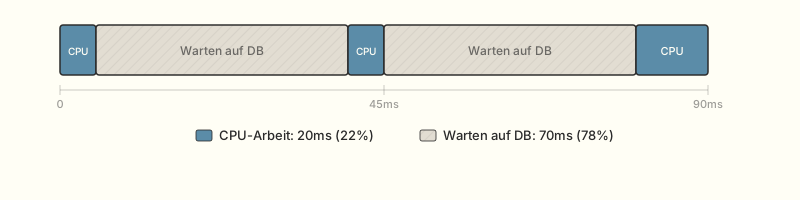
The response time W contains everything: CPU computation, waiting for the database, external calls, and also waiting for a free connection from the pool. In most web services, the waiting dominates so strongly that actual computation time becomes practically irrelevant. For the search service: 70 out of 90 milliseconds for the database. 78% of the time, the thread is blocked and waiting. In practice, it can even be 90% or more. This makes thread pools large, often irritatingly large: the threads are idle most of the time yet still occupy their slots.
“Thread pool” is a flattering name in that regard. “Thread waiting room” would be more honest.
Reactive frameworks and virtual threads
Reactive frameworks like Spring WebFlux or Vert.x and – since Java 21 – virtual threads address this problem directly: they decouple processing capacity from the number of blocked OS threads. This changes the optimisation approach, but not the fundamental statement of Little’s Law: the response time remains the response time, and $L = \lambda \times W$ still holds. And it changes nothing about the connection pool: whether an OS thread or a virtual thread is waiting for a database connection, the resource is needed either way.
Little’s Law gives the minimum for ongoing operation. The startup phase after a deployment (filling the connection pool, warming caches, etc.) is not included. Those buffers come on top.
From theory to practice
Little’s Law provides the calibration for our pools: how large do they need to be configured so that the expected traffic can be served?
The formula also works the other way round. I once saw a team running twenty instances for what was essentially a trivial service. Twenty instances – for a service that did little more than read data from a database and return it as JSON. A quick rough calculation using Little’s Law would have shown that three instances would have been sufficient and that the performance issue the team was trying to address with the 20 instances was caused by something entirely different.
Little’s Law is therefore not just a planning tool, but also a wonderful diagnostic tool for unnecessary resource consumption and inappropriate scaling.
However, the accuracy of the formula depends on the quality of the data it is fed. L is an average value, so with ‘bursty’ traffic, the actual concurrency could be significantly higher than the formula suggests. If you base pool sizes solely on the average, there will be no buffer during peaks. Furthermore, the response time is not a fixed value. It depends on the load on the database and how full the caches are. After deployment, when the caches are cold, W will look different to how it will look two hours later. What about peak throughput? While newsletter peaks can be predicted, viral social media posts cannot.
That’s why load testing is essential. Little’s Law tells you where to start. The load test shows what happens in practice. If the measured values deviate significantly from the calculation, it is a sign that something essential has been overlooked: a hidden dependency, a lock in the database or an invisible wait time under low load.
For those who want to take it a step further: Netflix’s open-source library concurrency-limits does not calculate the optimal concurrency once and for all, but adjusts it at runtime – using Little’s Law as a feedback loop rather than a planning tool.
The limits of an instance
Little’s Law answers the first question regarding scalability: How much can a single instance handle? Within a single instance, there are two factors:
- Reduce service time – faster code, fewer blocking calls, caching of frequently used results, algorithm optimisation.
- Increase capacity – expand pools, add more threads, add more database connections.
Both approaches have their limitations. The response time has a minimum threshold determined by the implementation and the database. Pools cannot grow indefinitely because the underlying resource – the database – does not scale accordingly.
The saturation point
Little’s Law assumes that the system is stable: the processing rate can keep up with the arrival rate. In the stable range, Concurrency grows proportionally with throughput. Everything is in perfect balance.
Once the load exceeds capacity, this behaviour reverses. Using the checkout example: if more customers arrive per minute than can be served, the queue grows, and with it the waiting time – indefinitely.
This transition is called the saturation point.
Backpressure – When systems learn to say no
What should you do when saturation is reached? Backpressure mechanisms signal to the caller to send data more slowly – rather than letting requests go unanswered.
Anyone expecting everything to run fine up to the capacity limit and then a clean step to appear will be disappointed in practice. A system runs stably at 70% utilisation, at 80% response times begin to rise, at 90% it breaks down. Flat for a long time, then steep – like a hockey stick.
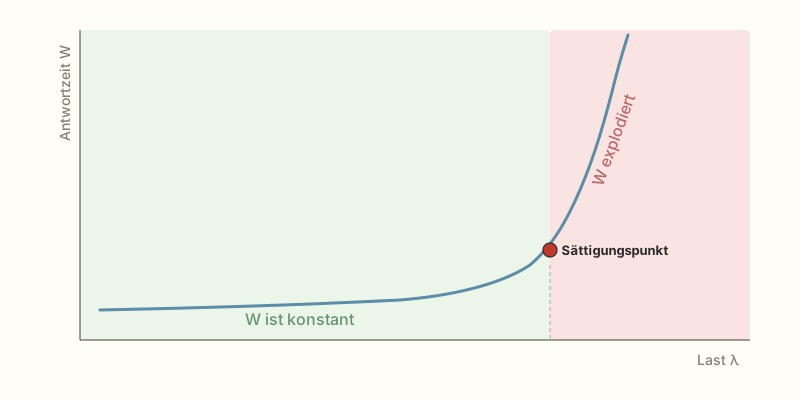
Why does a system that, according to Little’s Law, still has capacity, tip over? The short answer: not every request takes the same amount of time. The role this variability plays is the topic of the next post.
Sources
- Little (1961) – A Proof for the Queuing Formula: L = λW. Operations Research, 9(3), 383–387.
- Abbott & Fisher (2015a) – The Art of Scalability. 2nd ed. Addison-Wesley.
- Wooldridge: About Pool Sizing – HikariCP Wiki.
Comments